Choosing the Right Migration Approach for Workloads Moving to Azure
Successful Azure migration depends on matching each workload to the right business, technical, and operational strategy. This guide explains the seven common migration approaches and the assessment, governance, security, cost, and operating-model decisions that support a reliable move to Azure.
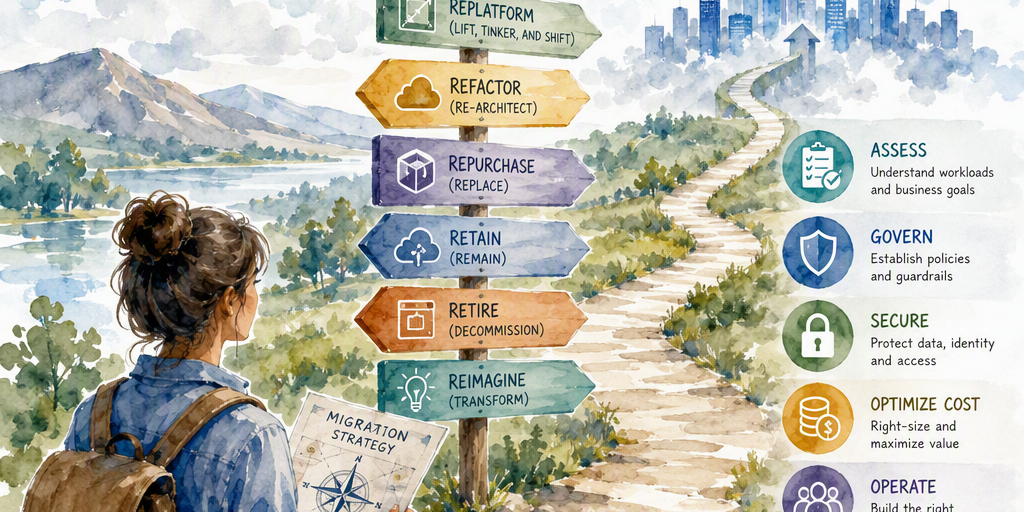
Moving workloads to Microsoft Azure is more than transferring servers from a data center to the cloud. It is a portfolio decision that can affect application architecture, security, operating models, staffing, licensing, resilience, and long-term costs.
Some workloads benefit from a rapid lift-and-shift migration. Others require targeted modernization, architectural redesign, replacement, retention, or removal. Applying one strategy to every application can preserve technical debt, increase risk, and direct investment toward systems that no longer provide meaningful business value.
A structured approach helps organizations match each workload to the Azure destination and migration method that best support its business objectives.
Why the migration approach matters
The selected approach affects migration speed, engineering effort, operating costs, scalability, performance, security, compliance, resilience, developer productivity, licensing, vendor dependence, and support responsibilities.
A rehosted application may reach Azure quickly but retain oversized virtual machines, outdated components, manual administration, and weak resilience. A rebuilt application may deliver greater strategic value but require more time, funding, testing, and organizational readiness.
The right decision depends on the workload's current condition, future importance, constraints, and expected business outcome.
The seven migration approaches
Microsoft commonly describes migration decisions through the seven Rs: rehost, refactor, rearchitect, rebuild, replace, retire, and retain. These are decision categories rather than rigid project stages. A workload may start with one approach and later move to another as priorities, constraints, and organizational capabilities change.
Rehost: Move with minimal change
Rehosting, often called lift and shift, moves a workload to Azure with few or no application-code changes. Physical or virtual servers may move to Azure Virtual Machines, with associated storage, networking, and backup services adapted to Azure.
Rehosting is appropriate when a data-center closure or hardware deadline creates urgency, the workload is compatible with Azure infrastructure, disruption must be minimized, or modernization will occur after stabilization. It can also suit applications with a short or uncertain remaining lifespan.
The main advantage is speed. The trade-off is that rehosting can preserve technical debt, manual administration, outdated licensing, and inefficient resource usage. Plans should include rightsizing, monitoring, security improvements, and a possible path to later modernization.
Refactor: Make targeted improvements
Refactoring introduces limited application or platform changes that allow a workload to benefit from Azure services without changing its fundamental application structure.
Examples include moving a database to Azure SQL Database or another managed database service, adopting Azure-managed storage, replacing self-managed messaging with managed services, automating delivery pipelines, or making a small component change that removes a specific operational constraint.
Refactoring is targeted modernization. It can reduce patching and administration while improving availability, security, and operational consistency. It requires compatibility, data migration, performance, licensing, security, and operational analysis.
Rearchitect: Change application boundaries and interactions
Rearchitecting makes deeper structural changes to address limitations in scalability, resilience, performance, security, or delivery speed. The application may retain much of its business logic, but its boundaries, communication patterns, data flows, or deployment architecture change substantially.
Examples include breaking a monolith into independently deployable components, introducing event-driven processing, separating read and write workloads, decoupling application tiers, or redesigning deployment around containers, serverless computing, or platform-as-a-service capabilities.
Unlike refactoring, which typically adopts selected managed services or makes focused improvements, rearchitecting changes how the application is organized and operates. It can create substantial long-term value for strategic systems but requires a clear target architecture, experienced technical leadership, extensive testing, and effective change management.
Rebuild: Create a new cloud-native application
Rebuilding replaces an existing application with a new implementation while preserving required business capabilities. The new solution may use Azure App Service, Azure Functions, Azure Container Apps, Azure Kubernetes Service, managed databases, event services, and other cloud-native technologies.
Rebuilding is appropriate when the existing codebase is difficult to maintain, cannot meet security or compliance requirements, cannot support expected scale or availability, or no longer reflects current business processes.
This approach offers the greatest opportunity for transformation but also creates significant delivery risk. A phased rebuild can reduce risk by exposing existing capabilities through APIs, migrating data incrementally, or releasing new functionality alongside the legacy system.
Replace: Adopt a packaged or SaaS solution
Replacing a custom application with a software-as-a-service product or packaged solution can remove the burden of maintaining specialized software. Replacement is attractive when a mature product meets most requirements, standardization is more valuable than customization, or internal teams need to focus on differentiated capabilities.
Evaluation should cover data migration, integration with identity and business systems, process changes, user training, licensing, data residency, compliance, vendor dependency, customization limits, and the provider's roadmap. A packaged solution can reduce infrastructure responsibilities while introducing commercial and operational dependencies that require governance.
Retire: Remove low-value systems
Retirement eliminates applications or components that are obsolete, duplicated, unused, or too costly to justify. It reduces migration scope, operating costs, and potential security exposure.
Before retiring a workload, teams should confirm ownership, identify active dependencies, preserve required records, communicate the change, and establish an approved data-retention or archival process. Retirement involves more than shutting down a server.
Retain: Keep the workload where it is
Retention keeps a workload in its current environment temporarily or permanently. This approach can be appropriate when contractual, regulatory, technical, latency, data-residency, licensing, or economic constraints outweigh the benefits of migration.
Retain is an active portfolio decision, not an omission. The decision should have an owner, documented rationale, review date, and plan for operating, securing, and eventually reassessing the workload.
Assess and rationalize the portfolio
Approach selection should follow discovery and assessment. A workload inventory should capture business purpose, owner, criticality, users, technology dependencies, compute and storage requirements, data classification, residency obligations, recovery objectives, availability and performance requirements, licensing, support arrangements, network and identity needs, planned retirement dates, and current operating costs.
Dependency mapping is essential. Applications may rely on shared databases, file shares, identity systems, DNS, batch jobs, messaging platforms, third-party services, or specific network routes. Moving only one component can create latency, authentication failures, data-consistency problems, or unexpected transfer costs.
Azure Migrate and related discovery and assessment capabilities can help collect inventory data, identify dependencies, estimate Azure readiness, and model infrastructure costs. Their output should inform decisions made with application owners, architects, security specialists, and business stakeholders.
Rationalization then determines which workloads deserve migration and which should be changed or removed. A practical review can classify workloads as follows:
- Rehost: Move quickly with limited changes.
- Refactor: Adopt selected Azure managed services or make targeted improvements.
- Rearchitect: Change application boundaries, interactions, or deployment architecture.
- Rebuild: Create a new implementation for future business needs.
- Replace: Move to SaaS or a packaged product.
- Retire: Remove the workload and archive required data.
- Retain: Keep the workload outside Azure until constraints or priorities change.
Rationalization prevents organizations from migrating systems that should have been retired or replaced and identifies shared platforms that should move in coordinated waves.
Use a decision matrix
The following matrix provides a concise starting point. Final decisions should account for dependencies, risk, cost, and the workload's expected life.
ApproachBest fitPrimary benefitMain consideration RehostUrgent moves, compatible workloads, short-lived systemsSpeed and limited changeTechnical debt and inefficient operations may remain RefactorWorkloads that need selected managed servicesLower administration with moderate effortCompatibility and data migration require planning RearchitectSystems constrained by current boundaries or communication patternsImproved scale, resilience, and delivery speedRequires substantial design and testing RebuildUnmaintainable or strategically unsuitable applicationsMaximum transformation potentialHighest delivery effort and business change ReplaceRequirements met by a mature SaaS or packaged productReduced custom software ownershipVendor, integration, data, and customization dependencies RetireObsolete, duplicated, or unused systemsReduced cost, scope, and attack surfaceDependencies and records must be verified RetainWorkloads blocked by regulatory, technical, contractual, or economic constraintsAvoided migration riskOngoing operations and future review remain necessaryAlign the approach with business drivers
Business priorities determine the balance between speed, transformation, and risk. A data-center closure may favor rehosting, while elastic scale, faster product delivery, or improved developer productivity may justify refactoring or rearchitecting.
A mature SaaS product may make replacement more efficient than rebuilding a custom system. A differentiated application that supports a core competitive advantage may warrant substantial modernization investment. A low-value or duplicated system may be best retired.
Select the Azure destination
The migration approach and Azure destination should be evaluated together. Common options include:
- Infrastructure as a service: Azure Virtual Machines for workloads requiring operating-system control or having limited application compatibility.
- Platform as a service: Azure App Service and similar platforms that reduce infrastructure administration.
- Managed databases: Azure SQL Database, Azure SQL Managed Instance, Azure Database for PostgreSQL, Azure Database for MySQL, and other managed data services.
- Containers: Azure Container Apps or Azure Kubernetes Service for containerized applications with different levels of orchestration and control.
- Serverless services: Azure Functions and event-driven services for elastic execution.
- Storage services: Azure Blob Storage, Azure Files, managed disks, and specialized storage patterns.
- Integration services: Messaging, API management, workflow, and event services.
Hybrid connectivity and management
- Connectivity: ExpressRoute and site-to-site VPN for private or encrypted connections between Azure and other environments.
- Hybrid and multicloud management: Azure Arc for managing and governing servers, Kubernetes clusters, and services across on-premises, edge, and other cloud environments.
Destinations should be assessed against reliability, security, cost optimization, operational excellence, performance efficiency, sustainability, and applicable compliance obligations. These are selected considerations from the Azure Well-Architected Framework.
Build the Azure foundation
Migration works best as part of a broader Azure adoption plan. Microsoft's Cloud Adoption Framework for Azure provides guidance across strategy, planning, readiness, adoption, governance, and management.
Azure landing zones establish a standardized foundation for subscriptions, management groups, identity, networking, security, logging, policy, and governance. Building this foundation before large-scale migration reduces inconsistency and rework. It should evolve as the Azure estate and organizational requirements change.
Evaluate total cost and risk
Infrastructure pricing alone does not provide a reliable business case. Cost comparisons should include compute, storage, databases, networking, data transfer, backup, disaster recovery, monitoring, security tools, licensing, migration labor, testing, remediation, modernization, training, change management, operations, and potential disruption.
Rehosting may appear inexpensive initially, but oversized virtual machines, inefficient licensing, and manual administration can reduce expected savings. Rightsizing, reservations, savings plans, autoscaling, and shutdown schedules can improve economics after migration. Modernization may require greater up-front investment while reducing operational effort and improving utilization, resilience, or time to market.
Migration waves should group workloads according to dependencies, business criticality, technical similarity, and operational readiness. A low-risk pilot can validate landing-zone controls, identity, connectivity, backup and recovery, monitoring, cutover, and rollback procedures.
Testing should cover functionality, performance, security, resilience, failover, backup and restore, disaster recovery, identity, routing, DNS, third-party integrations, scheduled processes, observability, incident response, and business validation. Rollback plans should define data synchronization, recovery steps, validation criteria, decision thresholds, timing, and ownership before cutover.
Design security and operations into the target state
Security controls should be established before workloads arrive. Important measures include centralized identity, least-privilege access, privileged-access protection, secrets and key management, network segmentation, private connectivity, encryption, security monitoring, vulnerability management, policy enforcement, centralized logging, audit trails, data classification, and retention.
Recovery time objectives and recovery point objectives should drive decisions about availability zones, backups, replication, failover, and region selection. Regulated, data-intensive, and latency-sensitive workloads may require data-residency controls, hybrid processing, customer-managed keys, specialized network designs, or restrictions on managed services.
Azure changes responsibilities for provisioning, patching, monitoring, incident response, identity, cost management, and compliance. Responsibilities should be assigned explicitly among application teams, platform teams, security, finance, and managed-service providers. Infrastructure as code, policy as code, automated testing, centralized observability, documented runbooks, clear service ownership, and FinOps practices support repeatable operations.
FinOps should connect consumption with owners, budgets, forecasts, tags, alerts, and optimization actions from design through post-migration operations. Reviews should compare actual results with the business case using measures such as availability, recovery performance, response times, security findings, user experience, Azure consumption, operating cost, operational effort, deployment frequency, incident volume, and modernization progress.
Use staged migration when appropriate
Many enterprises operate across on-premises infrastructure, Azure, other clouds, SaaS products, and edge locations during a transition. A staged strategy may begin with rehosting, continue with stabilization and rightsizing, and later introduce managed databases, containers, event-driven components, or platform services.
Teams should explicitly test latency, bandwidth, routing, DNS, identity flows, authentication, firewall inspection, data synchronization, failure scenarios, and recovery across environments. Hybrid operation is a valid implementation pattern, while retain is the portfolio decision to keep a particular workload outside Azure.
Key takeaway
Azure migration succeeds when organizations treat it as a business-led portfolio transformation rather than a server relocation project. Assess each workload, map its dependencies, clarify its future value, and select the approach that fits its technical and business requirements.
Use the seven Rs consistently, establish the Azure foundation early, validate decisions through pilot waves, and design security, sustainability, and operations into the target environment. A workload-specific strategy enables organizations to move at the right pace while creating a practical path toward lower complexity, stronger resilience, better economics, and long-term cloud value.
Summary
This guide provides a practical framework for deciding whether each workload should be rehosted, refactored, rearchitected, rebuilt, replaced, retired, or retained. It helps organizations reduce migration risk, avoid unnecessary cloud spending, and build a sustainable path to Azure modernization.