Migrate Web Application Proxy reverse-proxy services to Azure
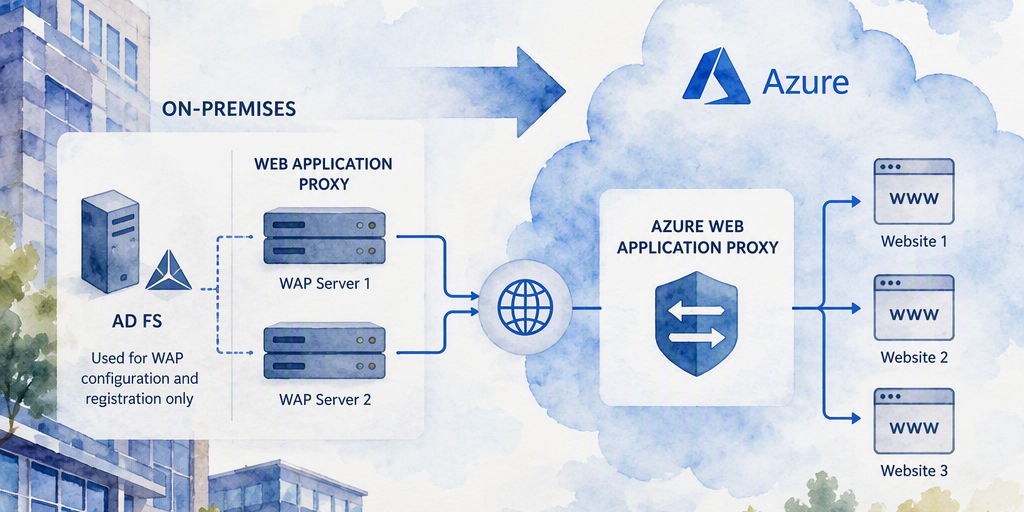
You have two on-premises Web Application Proxy (WAP) servers that reverse proxy externally accessible websites. In this environment, AD FS is used as the WAP configuration and registration dependency; it is not used to authenticate users to the published websi
1. Scenario and Architecture Decision
Two on-premises Web Application Proxy (WAP) servers reverse proxy externally accessible websites. In this environment, AD FS provides the WAP configuration and registration dependency; it does not authenticate users to the published websites.
WAP is not directly migrated to an Azure managed service. WAP publication definitions, certificates, DNS, routing, backend settings, firewall rules, and application-specific behavior must be recreated or preserved in the selected target architecture. AD FS relying-party trust, claims, and token-signing migration steps do not apply to these websites unless another workload uses AD FS for authentication.
Assess each publication independently. The target depends on whether it is a full website, an API, a private internal application, or a workload that requires the existing WAP and AD FS behavior.
- Full public websites: Azure Front Door with Web Application Firewall (WAF) is appropriate for global edge delivery, TLS termination, health-based routing, failover, and global WAF protection. Azure Application Gateway with WAF is appropriate for regional ingress, host- and path-based routing, and Azure or privately connected backends.
- APIs: Azure API Management is appropriate for API publication, authentication and authorization policies, throttling, transformation, subscription management, and API observability. APIM is not a general-purpose replacement for WAP or a universal website ingress service.
- Private internal web applications: Microsoft Entra Application Proxy may be appropriate when the application is compatible with its supported HTTP and HTTPS publishing model.
- Applications requiring current WAP behavior: A lift-and-shift deployment of WAP and its AD FS dependency on Azure virtual machines may provide a transitional path, subject to supportability, networking, availability, certificate, and domain requirements.
- Authentication: Microsoft Entra ID is a separate identity service. Front Door, Application Gateway, APIM, or Application Proxy does not automatically replace an application's identity provider.
2. Interim Recommendation
Keep the two existing WAP servers in service while the target architecture is designed and tested. This is the preferred short-term approach when the current WAP service is stable and APIM development is still in progress.
- Maintain both WAP servers and verify their high-availability arrangement.
- Keep the AD FS farm available because WAP depends on it for configuration and registration.
- Patch and monitor WAP and AD FS, and maintain tested backups and configuration exports.
- Renew the TLS certificates used by public hostnames and WAP listeners before they expire.
- Document every publication, listener, certificate, backend, route, health check, rewrite, timeout, header, and firewall rule.
- Classify each publication as a full website, API, private application, or special protocol workload.
- Develop APIM only for APIs and other routes that pass an explicit suitability assessment.
- Set an APIM readiness gate and a WAP review or retirement date so the interim arrangement does not become permanent by default.
Do not introduce Front Door or Application Gateway solely to replace WAP if no immediate business or technical requirement exists and the current service remains supportable. Conversely, do not force full websites through APIM merely because APIM is the planned strategic platform.
3. Target Options by Workload
Option A: Azure Front Door for global public websites
Use Azure Front Door when a public HTTP(S) website needs global edge ingress, TLS termination, acceleration, WAF protection, or health-based routing between origins.
Front Door provides the public entry point, hostname and certificate configuration, routing rules, origin groups, health probes, and edge WAF policy. The backend can be hosted in Azure or reached through an approved connectivity design. Validate origin security, private connectivity features, header behavior, WebSockets, uploads, redirects, and session requirements for each application.
Option B: Azure Application Gateway for regional or private websites
Use Azure Application Gateway with WAF for regional HTTP(S) applications that need host- or path-based routing, TLS termination, regional inspection, or connectivity to Azure and privately connected backends.
Application Gateway provides HTTP(S) reverse-proxy routing, listeners, backend pools, health probes, TLS policies, and WAF controls. It is not a general replacement for WAP for non-HTTP protocols. Use VPN, ExpressRoute, private connectivity, Azure Load Balancer, or another protocol-specific service when the workload requires TCP, UDP, or another network protocol.
Option C: Azure API Management for APIs and validated HTTP routes
Use APIM for APIs and for carefully scoped HTTP application routes that have been demonstrated to work with APIM. APIM can provide API routing, policies, authentication and authorization integration, transformations, rate limits, quotas, and API observability.
APIM does not automatically reproduce general WAP behavior. Treat session handling, cookies, redirects, large uploads, streaming, WebSockets, client certificates, hard-coded hostnames, custom headers, and application-specific routing as explicit compatibility tests. APIM backend settings and policies should not be presented as equivalent to the health probing and origin failover capabilities of Front Door or Application Gateway. Use Front Door or Application Gateway when ingress-level availability checks, origin selection, failover, or WAF are required.
APIM can be combined with Front Door or Application Gateway when the architecture requires both edge or regional ingress and API management. Define which service owns each responsibility.
Option D: Microsoft Entra Application Proxy for private applications
Use Microsoft Entra Application Proxy for supported private web applications that should be accessed through Microsoft Entra ID without direct inbound exposure of the application or connector network.
Deploy at least two connectors in a connector group for production availability. Test the internal and external URLs, preauthentication, single sign-on method, Kerberos constrained delegation, SPNs, URL translation, cookies, redirects, WebSockets, uploads, custom domains, certificates, user assignments, and Conditional Access policies.
Application Proxy is not a general TCP or UDP reverse proxy and is not the default replacement for websites that are already public.
Option E: Lift and shift WAP and AD FS to Azure virtual machines
When preserving existing WAP behavior is more important than adopting a managed ingress service, host WAP and its AD FS dependency on Azure virtual machines as a transitional design. This is an infrastructure migration, not a conversion to an Azure-native replacement.
The design requires assessment of:
- Windows Server and WAP supportability, licensing, patching, and lifecycle status.
- AD DS, DNS, domain controller, and AD FS dependencies.
- Network connectivity between Azure, on-premises systems, published backends, and management networks.
- External load balancing or another supported method for distributing traffic across two WAP virtual machines.
- Public TLS certificates, private-key protection, certificate renewal, and listener configuration.
- Availability zones or separate failure domains, backup, disaster recovery, monitoring, and secure administration.
- Microsoft support requirements and any limitations associated with the selected Azure VM and networking design.
This option can reduce immediate application change, but it retains the WAP, AD FS, Windows Server, and certificate-management responsibilities. Use it as a deliberate transitional architecture rather than assuming that moving the virtual machines removes those dependencies.
4. Decision Matrix
RequirementRecommended targetImportant qualification Global public HTTP(S) website needs edge routing, WAF, or origin failoverAzure Front Door with WAFValidate origin connectivity, session behavior, certificates, and application compatibility. Regional or privately connected HTTP(S) website needs host/path routing or WAFAzure Application Gateway with WAFApplication Gateway is an HTTP(S) reverse proxy, not a general non-HTTP publishing service. API requires policies, throttling, transformations, or API subscriptionsAzure API ManagementDo not assume APIM reproduces full website publishing or WAP behavior. Private web application is compatible with Application ProxyMicrosoft Entra Application ProxyUse a connector group with at least two connectors for production availability. Application supports modern authenticationMicrosoft Entra ID integrationModernize the application or configure the vendor-supported enterprise application pattern. Existing WAP behavior must be preserved with minimal application changeWAP and AD FS on Azure virtual machinesValidate supportability, networking, certificates, availability, and operational cost. TCP, UDP, or another non-HTTP protocolVPN, private connectivity, Azure Load Balancer, or another protocol-specific serviceDo not assume Application Gateway or Application Proxy is suitable.5. Discovery and Assessment
Create an inventory before changing either WAP server. Record the following for every publication:
- Application owner, business criticality, maintenance window, and support contacts.
- Internal and external URLs, DNS records, ports, protocols, backend servers, and network dependencies.
- Whether the workload is a full website, API, private application, or non-HTTP service.
- Authentication behavior. AD FS relying-party trust and claims information is not required when AD FS only provides WAP configuration and registration.
- WAP publication name, preauthentication setting, certificate thumbprint, proxy settings, and listener configuration.
- Cookies, sessions, redirects, hard-coded URLs, upload sizes, WebSockets, client certificates, APIs, and mobile-client behavior.
- Kerberos constrained delegation, SPNs, access to on-premises resources, and backend name-resolution requirements.
- Existing access restrictions, logging, monitoring, health checks, and firewall rules.
Capture the current WAP and certificate state on each WAP server:
Get-WindowsFeature Web-Application-Proxy Get-ChildItem Cert:\LocalMachine\My | Select-Object Subject, Thumbprint, NotAfter, EnhancedKeyUsageListReview AD FS relying-party trusts only when another workload uses AD FS for authentication:
Get-AdfsRelyingPartyTrust | Select-Object Name, Enabled, Identifier, WSFedEndpoint, SamlEndpointAlso document the AD FS farm relationship, WAP registration and configuration dependency, certificate expiration dates, recovery procedures, and any service accounts. Store records securely and do not place private keys or passwords in the migration document.
6. Migration and Testing Sequence
Phase 1: Stabilize WAP
- Inventory and classify every publication.
- Verify that both WAP servers serve traffic and that failover works.
- Confirm reliable communication between WAP and the AD FS farm.
- Renew expiring certificates and verify the complete certificate chain.
- Export the current configuration and document rollback.
- Establish monitoring for WAP, AD FS, backend reachability, latency, capacity, and HTTP errors.
Phase 2: Select and build the target
- Select Front Door, Application Gateway, APIM, Application Proxy, Azure VM-based WAP, or a protocol-specific service for each workload.
- Define ownership for public ingress, routing, health checks, failover, WAF, authentication, certificates, and backend protection.
- Establish private connectivity or an approved public backend design.
- Configure a test hostname or isolated endpoint without changing production DNS.
Phase 3: Validate application behavior
Test normal and error requests, deep links, redirects, cookies, sessions, uploads, downloads, APIs, WebSockets, client certificates, authentication, authorization, timeout behavior, and representative client types. Test backend failure, health-check behavior, failover where supported, certificate renewal, logging, alerting, performance, and concurrency.
For APIM specifically, approve production use only when the route is an API or a deliberately scoped HTTP workload and all required behavior has been demonstrated. Do not use successful connectivity or a successful health-policy response as proof that APIM provides the same availability and routing behavior as Front Door or Application Gateway.
Useful connectivity checks include:
Resolve-DnsName internal-app.contoso.com Test-NetConnection internal-app.contoso.com -Port 443 Invoke-WebRequest https://internal-app.contoso.com/health -UseBasicParsingReplace the example hostname and health endpoint with the values for the application. A successful TCP connection does not prove that TLS, routing, policies, authentication, or application functionality are correct.
Phase 4: Cut over and retire
- Freeze application, proxy, target-service, DNS, and certificate changes.
- Lower DNS TTL in advance when DNS changes are required.
- Confirm target-service readiness, monitoring, support ownership, certificates, and rollback approval.
- Move one hostname or workload at a time during an approved maintenance window.
- Perform smoke tests from multiple networks and with representative clients.
- Monitor target-service logs, backend logs, DNS, TLS, latency, health status, and HTTP errors.
- Retain WAP and the AD FS dependency through the agreed stabilization and rollback period.
- Decommission WAP only after all dependent workloads have migrated and no rollback is required.
- Retire AD FS separately after confirming that no other workload depends on it for authentication or another service.
7. Cutover, Rollback, and Operations
Rollback may involve restoring the previous DNS record or external endpoint, re-enabling the WAP publication, disabling an affected target route or policy, or restoring the previous certificate, backend, or routing configuration. Keep the old DNS records, certificates, configuration exports, administrative access, and WAP servers available until the stabilization period has closed.
During the interim and migration period:
- Restrict WAP and AD FS administration to approved management networks.
- Track certificate ownership, private-key permissions, renewal procedures, and expiry alerts.
- Maintain backups and disaster-recovery procedures for WAP, AD FS, and any Azure VM-based target.
- Monitor the health of the service that owns availability checks and failover. For Front Door and Application Gateway, this includes origin or backend health probes and routing behavior. For APIM, monitor gateway, backend, policy, and API metrics without treating them as an equivalent to ingress failover.
- Update diagrams, runbooks, incident procedures, DNS records, monitoring, and certificate ownership after each migration.
8. Common Risks and Mitigations
- Treating APIM as a direct WAP replacement: Use APIM primarily for APIs and validate every exceptional HTTP application behavior before approval.
- Assigning health and failover to the wrong service: Define whether Front Door, Application Gateway, APIM, the application, or another component owns availability checks and traffic failover.
- Assuming a managed service preserves WAP behavior: Test sessions, redirects, uploads, WebSockets, client certificates, headers, and hard-coded hostnames.
- Moving WAP to Azure without a supportable design: Validate Windows, WAP, AD FS, domain, networking, certificate, licensing, availability, and Microsoft support requirements before deploying Azure VMs.
- Overexposing backend servers: Keep backends private where possible and restrict NSGs, firewalls, and routes to required sources.
- Expired or mismatched certificates: Inventory certificates early and automate renewal for the selected target.
- Premature retirement: Review WAP, AD FS, DNS, and backend logs for residual dependencies before shutdown.
- Weak rollback planning: Retain the previous service, configuration, certificates, DNS information, and administrative access through stabilization.
9. Final Recommendation
Continue using the two WAP servers as a controlled, time-bound interim service while each publication is assessed. Maintain AD FS because it provides the WAP configuration and registration dependency, but do not treat this as an AD FS authentication migration.
Use Azure Front Door or Application Gateway as the likely targets for full public websites, depending on global or regional requirements. Use APIM for APIs and only for carefully validated HTTP application routes. Use Microsoft Entra Application Proxy for compatible private applications, and consider Azure VM-based WAP and AD FS only when preserving existing behavior justifies retaining the infrastructure and its operational responsibilities.
Migrate one workload at a time, define ownership for routing, health checks, failover, WAF, authentication, and certificates, and retain WAP through the stabilization and rollback period. Decommission WAP only after every dependent workload has migrated successfully. Retire AD FS separately after confirming that no remaining workload depends on it.
Summary
Practical guidance about Migrate Web Application Proxy reverse-proxy services to Azure.