Planning Data Migration and Cutover for Workloads Moving to Azure
A successful Azure migration requires more than moving applications and infrastructure. This practical guide explains how to assess dependencies, select a migration method, protect data integrity, rehearse cutover, manage rollback, and stabilize workloads after the transition.
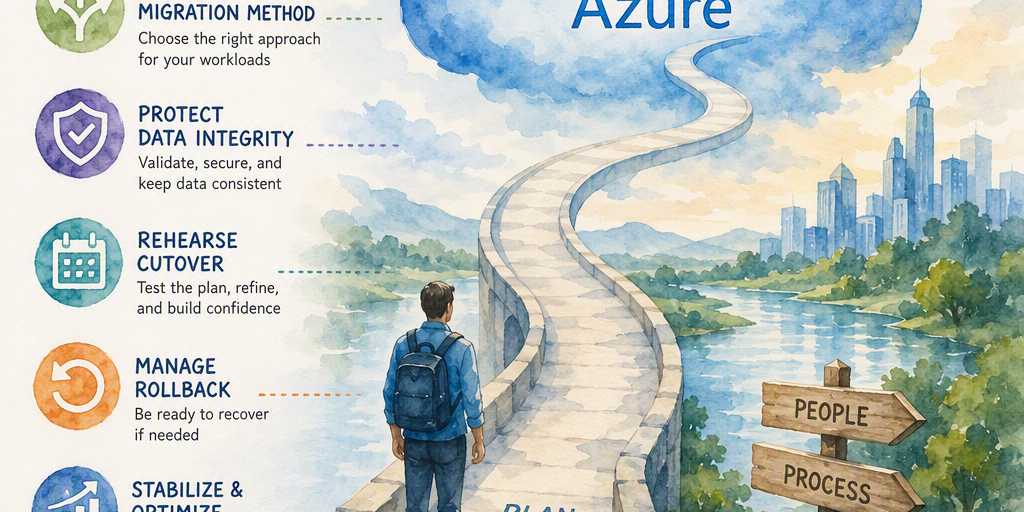
Moving a workload to Azure involves more than provisioning virtual machines, configuring databases, or copying files. A successful migration requires data to arrive intact, connected applications to continue functioning, and users to experience a controlled transition with minimal disruption.
Data migration and production cutover often present the greatest operational risks in an Azure project. Transfer delays, incomplete dependency maps, inconsistent records, permission failures, and unclear rollback procedures can undermine an otherwise sound infrastructure design. A disciplined plan turns cutover into a controlled business event with measurable outcomes.
Understand the Risks of Data Migration
Applications may depend on databases, file shares, queues, identity systems, scheduled jobs, reporting platforms, external interfaces, and user permissions. Moving one component without understanding these relationships can create failures that are difficult to diagnose after the transition.
Common risks include:
- Underestimating data volume or daily change rates
- Selecting a transfer method that cannot meet the downtime target
- Missing downstream consumers or scheduled processes
- Losing permissions, metadata, indexes, or database objects
- Failing to capture changes made during the migration window
- Discovering differences in target-platform behavior
- Changing DNS or connection strings before the target is ready
- Retiring the source environment before the new workload is stable
- Assigning unclear ownership during cutover
A completed data copy is not sufficient evidence of readiness. The target data must be complete, usable, secure, recoverable, and ready to support business operations.
Begin with Discovery and Assessment
Planning starts with a reliable view of the current environment. Inventory each workload, its data stores, and the services that support or consume it.
Build a workload and data inventory
Document applications, virtual machines, databases, file shares, analytics platforms, data volumes, file counts, database sizes, expected growth, and normal and peak change rates. Record data formats, schemas, encodings, compression methods, retention requirements, and archival needs.
Separate active data that must move from data that can be archived or retired. This can reduce transfer time and Azure storage costs. Include production, test, development, and disaster-recovery environments, and assign an owner to every application, data store, and supporting service.
Map dependencies
Identify relationships that could affect migration or cutover, including:
- Application-to-database connections
- File-share mounts and storage paths
- Service accounts and managed identities
- Authentication and authorization providers
- Network routes, firewall rules, VPNs, and private connections
- Message queues and event streams
- Scheduled jobs, batch processes, and automation
- Reporting, analytics, and data-extract consumers
- External vendors and partner integrations
- Monitoring, backup, alerting, and service-desk workflows
Azure Migrate can help establish an initial inventory and dependency view in supported environments when the relevant discovery method is configured. Supplement automated discovery with interviews, configuration reviews, traffic analysis, and application-owner validation.
Classify business and technical requirements
Classify each workload according to business criticality, data sensitivity, regulatory and residency requirements, recovery point objective, recovery time objective, acceptable interruption, performance, latency, availability, and maintenance-window limitations.
These classifications influence the migration pattern, replication design, target architecture, testing depth, and cutover schedule.
Select a Migration Pattern That Fits the Workload
The migration method should reflect data size, change rate, compatibility requirements, connectivity, and downtime tolerance.
Offline migration
An offline migration pauses or stops source activity, transfers the data, validates the target, and directs users to Azure. It can be simpler and can provide a consistent point-in-time result when source writes are fully stopped or otherwise controlled. It requires a planned outage.
Offline migration may suit small or infrequently changing data sets, development and test workloads, applications with generous maintenance windows, or systems where replication is unavailable or overly complex.
The outage estimate must include application shutdown, final backup, data validation, configuration changes, startup, smoke testing, and business approval. The transfer itself is only one part of the maintenance window.
Online migration
An online migration uses continuous or near-continuous replication while the source remains available. During cutover, the source is usually quiesced, final changes are synchronized, and traffic is redirected to the target.
This pattern can reduce downtime for high-volume databases, business-critical applications, frequently changing systems, globally distributed workloads, and applications with strict recovery objectives. Actual online capabilities depend substantially on the database engine, source and target versions, migration tool, and selected configuration.
Monitor replication health, lag, conflicts, transaction consistency, and changes made during final synchronization. Define the authoritative copy of the data at every stage.
Rehost and replatform decisions
A rehost, or lift-and-shift, moves a workload with limited application change. It can reduce initial transformation effort but may preserve existing operational inefficiencies.
A replatform approach may move a database to an Azure-managed service or replace existing storage with Azure-native capabilities. This can reduce long-term administration but may require changes to schemas, drivers, authentication, backup processes, performance settings, or application code.
Assess managed services for supported database features and versions, driver compatibility, maintenance behavior, backup and restore capabilities, performance limits, scaling behavior, network and identity integration, licensing, and cost.
Match Azure Tools to the Migration Scenario
Azure provides several services and tools for workload assessment and data movement. Capabilities, supported source and target combinations, and service availability can change, so verify current Microsoft documentation before selecting a tool.
- Azure Migrate supports assessment and migration scenarios for various workloads and can help establish inventory, dependencies, sizing estimates, and migration waves where the environment and discovery method are supported.
- Azure Database Migration Service supports selected database migration scenarios. Confirm the current supported source and target engines, versions, migration modes, and feature limitations before relying on it for an online or offline move.
- AzCopy provides command-line data transfer for supported Azure Storage scenarios and is useful for scripted, repeatable file and object transfers.
- Azure Data Box uses an encrypted physical appliance for large data volumes when network transfer would take too long or connectivity is limited.
- Azure Storage Mover is designed for supported file and storage migration scenarios. Verify supported source environments, target services, transfer features, and regional availability for the planned migration.
- Native database replication, backup and restore, export/import, and vendor-specific tools may be better suited to particular database engines, versions, or high-availability architectures.
Evaluate every method against data volume, daily change rate, available bandwidth, measured throughput, encryption requirements, transaction consistency, schema compatibility, pause and retry capabilities, monitoring, licensing, operating cost, downtime, and rollback options.
Base transfer estimates on measured throughput rather than theoretical network capacity. Encryption, protocol overhead, file sizes, latency, throttling, and competing workloads can significantly affect real-world performance.
Prepare the Azure Landing Zone
Data migration should not begin until the target environment can operate securely and reliably. Prepare the identity, networking, governance, and operational capabilities required by the workload.
Validate the following:
- Subscription and resource-group structure
- Region selection and data-residency requirements
- Virtual networks, subnets, routing, and firewall controls
- VPN, ExpressRoute, private endpoints, or other connectivity
- Identity integration and least-privilege access
- Key management and encryption responsibilities
- Logging, monitoring, alerting, and diagnostic retention
- Backup, recovery, and disaster-recovery configuration
- Azure Policy and security-baseline enforcement
- Resource tagging and cost allocation
Connectivity design affects both migration speed and security. Online replication may require stable, low-latency paths, while private connectivity and controlled firewall rules can reduce exposure during transfer.
Use Azure Cost Management from the beginning. Track temporary migration resources, replicated data, storage transactions, network charges, egress, Data Box operations, and additional post-cutover capacity.
Protect Data Integrity and Security
A completed transfer does not prove that the data is correct. Validation must demonstrate that data arrived completely, consistently, securely, and in a form the application can use.
Define the change-capture strategy
Document how changes will be handled between the initial transfer and final cutover. Options include application write freezes, continuous replication, change-data capture, transaction-log shipping, database-native replication, application queues, controlled dual processing, and incremental file synchronization.
The plan must identify the authoritative copy at every stage. Ambiguity about the source of truth can result in lost updates or conflicting records.
Validate at multiple levels
Use transfer-level checks such as file counts and sizes, object counts, checksums or hashes, database row counts, backup and restore results, replication status and lag, transaction ranges, and sequence continuity.
Platform-level validation should cover database objects, indexes, constraints, permissions, storage metadata, access controls, encryption, network reachability, identity behavior, backup schedules, and retention. Application-level validation should cover:
- Login, authorization, searches, and record updates
- File uploads and downloads
- Reports, scheduled jobs, and document generation
- External integrations, message processing, and notifications
- Performance under representative load
Record reconciliation results and obtain approval from the appropriate technical and business owners. Define acceptance thresholds before execution because acceptable discrepancies vary by workload.
Apply security controls
Protect data throughout the migration with encryption in transit and at rest, least-privilege identities, private connectivity where appropriate, restricted administrative access, key-management procedures, audit logging, data masking for nonproduction environments, retention controls, and approved handling procedures for sensitive or regulated data.
Confirm that Azure region selection, backup locations, access policies, and logging meet applicable regulatory and organizational requirements.
Design Cutover as an Operational Event
Manage cutover through a detailed runbook rather than an informal sequence of technical tasks. Include task order, named owners and backups, expected durations, dependencies, entry criteria, decision points, validation steps, communications, escalation contacts, go/no-go criteria, rollback triggers, and evidence requirements.
A typical production cutover includes:
- Confirm change approvals, stakeholder availability, and support coverage.
- Communicate the maintenance window and user instructions.
- Pause scheduled jobs and nonessential integrations.
- Apply the agreed application or database write freeze.
- Take a final source backup or recovery point.
- Confirm replication health and complete final synchronization.
- Validate target data, permissions, configuration, and connectivity.
- Perform the final source application shutdown and protect the source endpoints from new traffic.
- Redirect traffic through DNS, connection strings, load balancers, or configuration changes.
- Start the target application and dependent services.
- Perform technical smoke tests and business-owner validation.
- Monitor performance, errors, replication status, and user activity.
- Announce completion or initiate rollback according to the decision criteria.
DNS changes require particular care. Lowering time-to-live values in advance can reduce transition time, but resolver and client caching may continue directing users to the old endpoint. Connection pools, hard-coded addresses, and cached application settings can also delay the transition.
Canary, phased, or blue-green deployments can reduce the blast radius when the architecture supports them. A limited user group or traffic segment can validate the target before all production traffic moves.
Rehearse Before Production
Conduct at least one full dress rehearsal using representative data volumes, automation, validation queries, operational contacts, and timing. Measure rather than estimate:
- Initial and incremental transfer duration
- Replication lag and final synchronization time
- Application shutdown and startup duration
- DNS or endpoint transition behavior
- Validation effort, support response times, and rollback duration
Test functional workflows and integrations, not only infrastructure health. Include authentication, reporting, scheduled jobs, file generation, external interfaces, monitoring, alerting, backup operations, and service-desk procedures.
Use rehearsal findings to improve validation scripts, reduce manual actions, clarify ownership, update timing estimates, strengthen go/no-go criteria, improve communications, and document workarounds for known issues.
Establish a Practical Rollback Plan
Rollback is not simply a matter of restoring a backup. The plan must explain how writes and changes will be handled after traffic begins using the target.
Define rollback triggers before cutover. Examples include failed reconciliation, unacceptable latency, broken authentication, failed integrations, data corruption, missing functionality, security-control failures, missed recovery objectives, or business-owner rejection.
The rollback plan should identify:
- Whether the source remains authoritative
- How target-side writes will be stopped or captured
- How new changes will be reconciled
- How traffic, DNS, connection strings, and routing will return to the source
- Which backups or recovery points will be used
- Who can make the rollback decision
- How users and stakeholders will be informed
Keep the source environment available in a controlled state throughout stabilization. Backups alone may not provide a fast recovery path for an actively changing workload. Test restore procedures separately from migration tests because an untested backup is not a proven recovery mechanism.
Manage the Stabilization Period
The migration is not complete when traffic first reaches Azure. Establish a defined stabilization period with enhanced monitoring and clear ownership.
Monitor application response times, error rates, failed transactions, database performance, storage latency and capacity, authentication failures, integration queues, scheduled jobs, backup completion, security alerts, user reports, service-desk activity, Azure resource consumption, and cost.
Maintain heightened support coverage during the first business cycles, including scheduled reports, batch runs, billing processes, or peak usage periods.
Treat decommissioning as a separate milestone. Retain the source system, backups, logs, and migration evidence until technical and business owners approve retirement and all audit or retention requirements have been satisfied.
Organize Migration Waves Around Dependencies
A wave-based approach reduces risk by grouping workloads according to dependency and business function. Avoid moving isolated systems without considering the applications and services connected to them.
A practical sequence may include:
- Low-risk or nonproduction workloads
- Shared services and supporting components
- A representative business application
- Dependent databases, file stores, and integrations
- Higher-criticality production workloads
- Remaining edge cases and legacy systems
Each wave should produce reusable assets such as assessment templates, migration scripts, validation queries, cutover runbooks, communication templates, monitoring dashboards, rollback procedures, and documented lessons learned.
Cutover Readiness Checklist
Before approving production cutover, confirm that:
- Data stores and dependencies have identified owners.
- Data volume and change-rate measurements are available.
- The migration method meets downtime and recovery objectives.
- Azure connectivity and security controls have been tested.
- Target data has passed technical and application validation.
- Backup and restore procedures have been proven.
- Replication is healthy, or the final transfer is complete.
- Scheduled jobs and integrations have documented treatment.
- DNS and endpoint changes have been prepared.
- Stakeholders, support teams, and approvers are available.
- The runbook has been rehearsed using representative conditions.
- Go/no-go criteria and rollback triggers are explicit.
- The source remains available for the stabilization period.
- Monitoring, cost tracking, and incident procedures are active.
- Decommissioning is scheduled as a later, separately approved step.
Key Takeaway
Reliable Azure migration depends on treating data movement and cutover as coordinated operational disciplines. Discovery reveals dependencies, the migration method controls downtime, validation protects data integrity, rehearsal exposes practical delays, and rollback planning preserves business continuity.
Start with a measured inventory, select a migration pattern that fits the workload, verify current Azure service capabilities, prepare the landing zone, and execute cutover through an approved and rehearsed runbook. Clear ownership, evidence-based readiness criteria, and a controlled stabilization period create a repeatable foundation for future migration waves.
Summary
This guide provides a practical framework for reducing the operational risks of Azure migration, with clear planning steps for data discovery, transfer, validation, cutover, rollback, and post-migration stabilization.